NEKOM · BUSINESS OPERATIONS PLATFORM

Orders, inventory and product data.
Working together.

NEKOM helps you manage and automate commerce operations across stores, marketplaces, warehouses and customer service. Your ERP stays in place.

  • Less manual order processing
  • Reliable inventory across your channels
  • Manage and distribute product data centrally
For agencies: Deliver customer projects together →
YOUR SYSTEMS. WORKING TOGETHER.N / 01
ERP systems
Online stores
Marketplaces
NEKOM

BUSINESS OPERATIONS PLATFORM

PIMOMSWMSSalesServiceAutomation
Warehouses
Fulfilment
Customer service
B2B partners
REST / gRPCData · Rules · Workflows
ERPCOMMERCEPRODUCT DATAFULFILLMENTSERVICEONE CONNECTED WORKFLOW

NEKOM IN ACTION

Complex commerce challenges. Real operational solutions.

From legacy ERP integrations and large product catalogues to multi-location fulfilment: explore how NEKOM addresses the operations behind modern commerce.

01 / Legacy ERP Integration

Your storefront is ready. Your ERP integration isn't.

The storefront is ready. Pricing, inventory and orders are not. NEKOM connects existing ERP systems to commerce with clear operational handovers.

More control over integration scope and handovers

Explore the Use Case
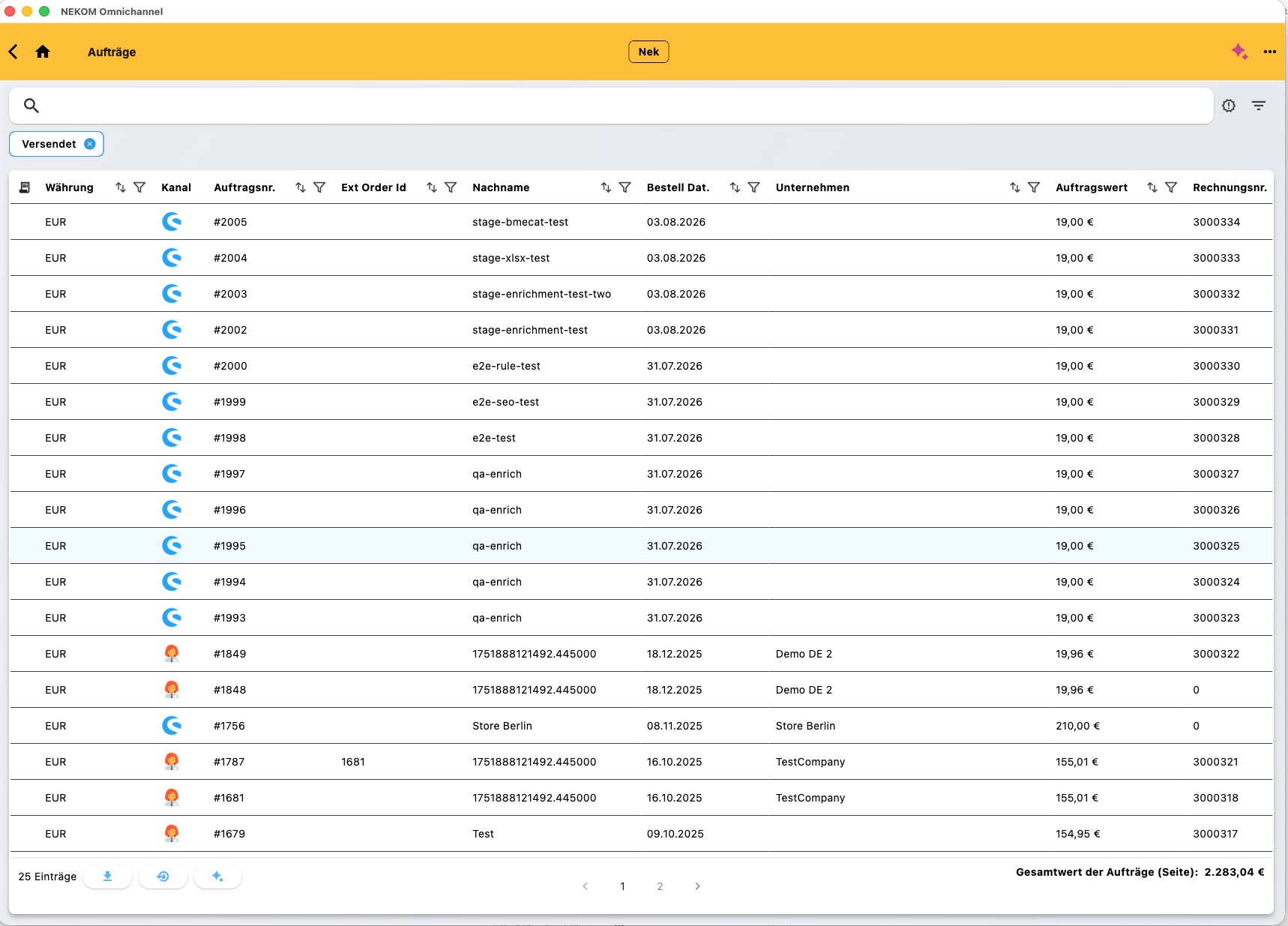
NEKOM order overview with search, filters, channel information, status and order references.
NEKOM OMS · Representative application view. This list shows operational orders, not ERP mapping configuration.

02 / Product Data Automation

500,000 products. Without 500,000 manual tasks.

Illustrative 500,000-product scenario, not a performance guarantee. Large catalogues need more than individual product records. NEKOM supports preparation, enrichment and channel-specific checks for product information.

More consistent information across sources

Explore the Use Case
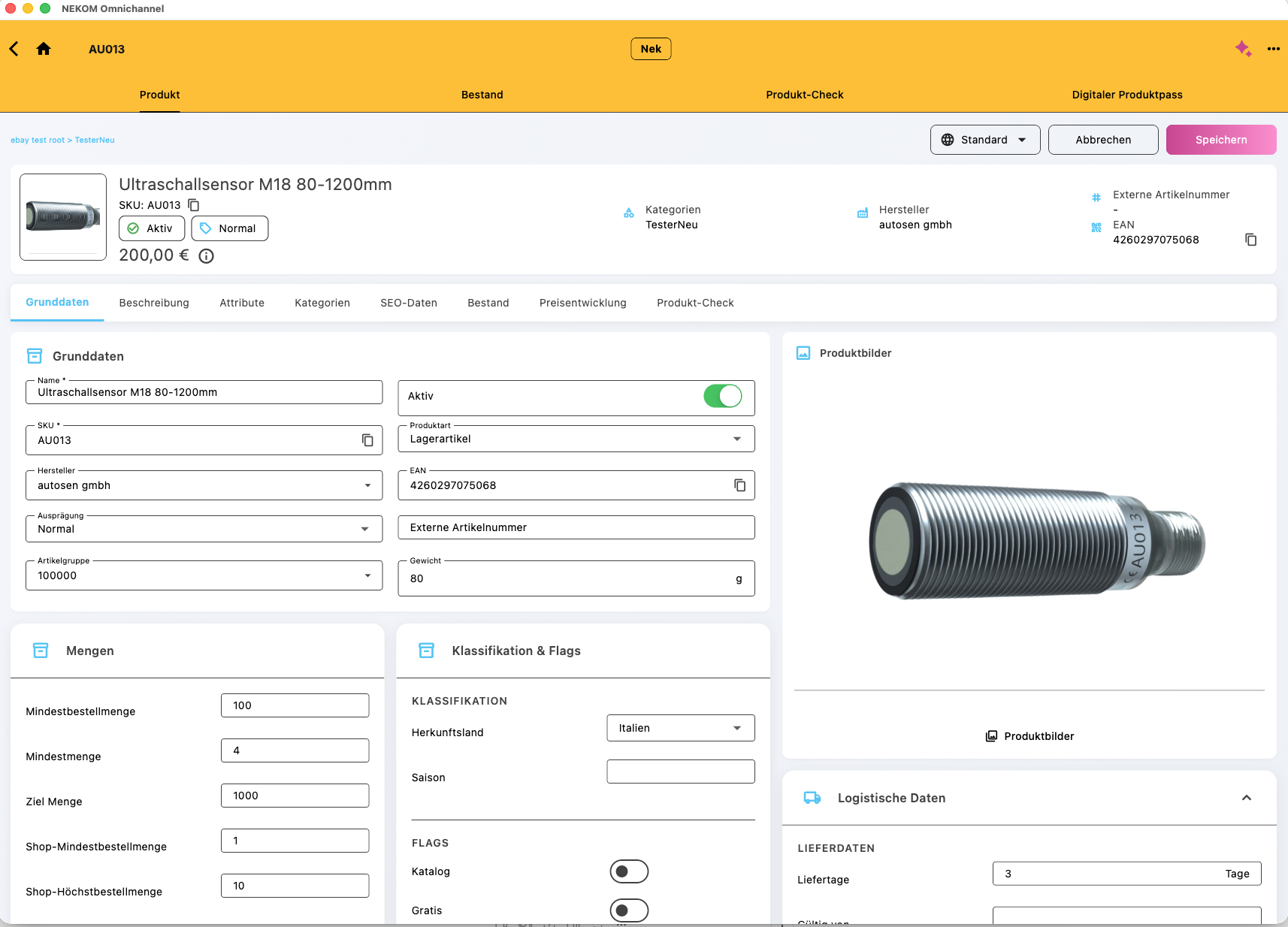
NEKOM PIM product record with SKU, product name, type, EAN, manufacturer, category, image and tabs for further product information.
NEKOM PIM · Representative product view. Tabs point to additional areas; their contents are not open in this view.
Product CheckWhat is missing for the next channel?

03 / Shopify Commerce Operations

Shopify isn't the problem. What happens behind it is.

Multiple warehouses, suppliers and channels change the requirements. NEKOM connects Shopify to the inventory and order workflows behind it.

Provide inventory quantities with clear business meaning

Explore the Use Case
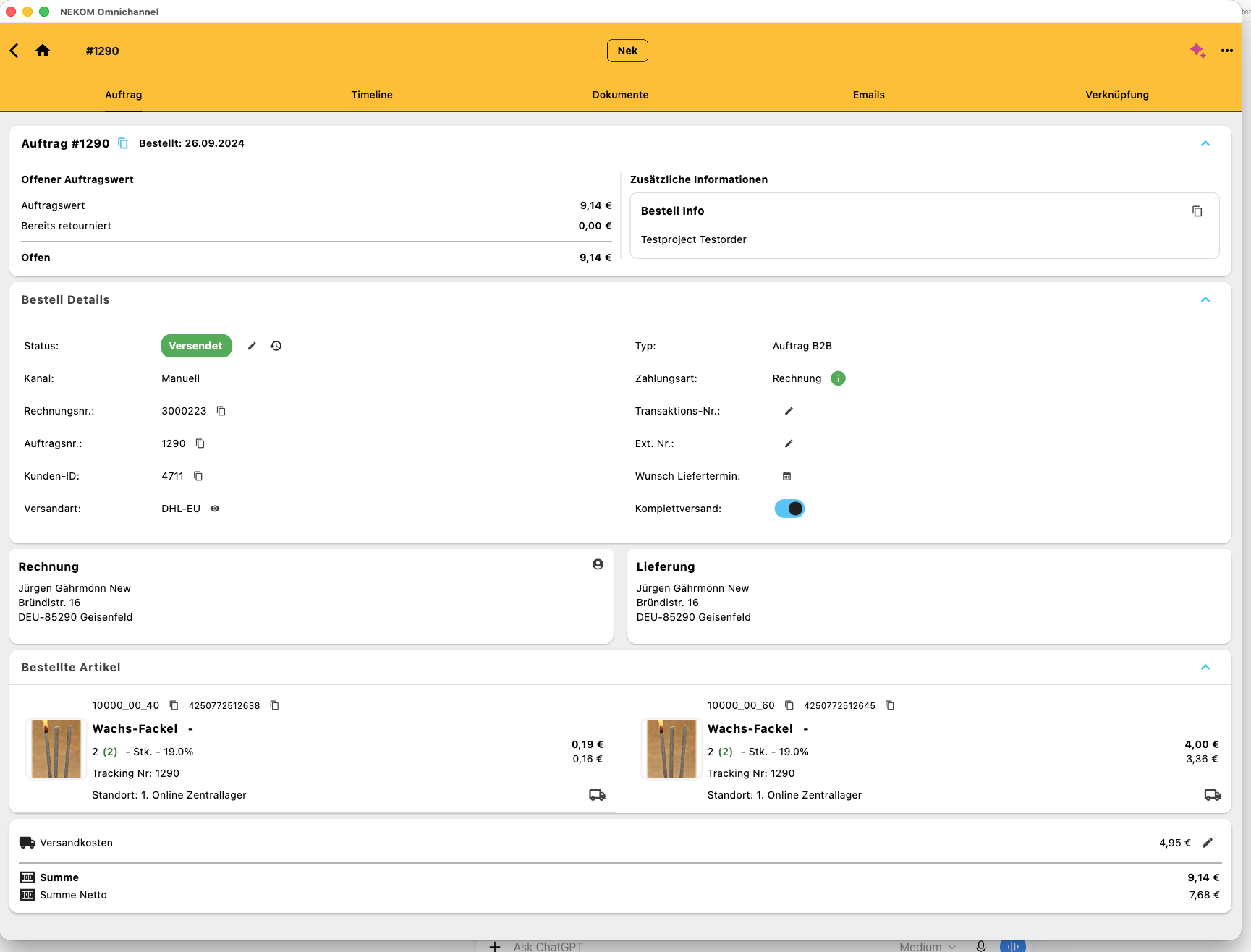
NEKOM order detail with status, line items, customer references, billing, delivery and shipping information.
NEKOM OMS · Representative order view. Not the Shopify interface or a screenshot of a named customer project.

INTERACTIVE USE CASE

80 Units in Stock. How Many Should Shopify Actually Sell?

One warehouse, one supplier and one retail store. Together, they hold 80 units. But not every unit should automatically be available across every sales channel.

Own warehouse50 unitsIncluded
Supplier20 unitsIncluded
Retail store10 unitsIncluded

NEKOM Business Rules

Adjust the business rules and see how the calculated Shopify sellable quantity changes.

10

The preview keeps retail stock (10) and safety buffer (5) unchanged.

SELLABLE ON SHOPIFY

65 units

All three inventory sources are included. After reserving 10 units for B2B customers and keeping a 5-unit safety buffer, 65 units remain sellable on Shopify.

50 + 20 + 10 − 10 − 5 = 65

Simplified front-end simulation. No live Shopify connection, no synchronization and not NEKOM’s actual inventory allocation algorithm.

Syncing Inventory Is Easy. Deciding What's Sellable Is What Matters.

Reservations and safety buffers determine what a channel can offer. Agreed rules help protect B2B commitments and release inventory to Shopify in a controlled way. The actual logic is defined around your systems and workflows.

Your Inventory Rules Are More Complex Than This Example?

THE NEKOM ARCHITECTURE

Keep Your ERP. Connect the Operations Around It.

A connector transfers data. NEKOM connects that data with business rules and coordinates workflows across commerce, ERP, warehouses and service. Your existing systems retain their agreed responsibilities.

ERP: commercial responsibility

Your ERP can remain the system of record for commercial master data, purchasing and accounting. Responsibilities and handovers depend on your architecture and are agreed for the project.

NEKOM: rules and workflows

Order data, availability and customer terms connect with rules for reservations, routing, fulfilment and service. Data transfers become coordinated workflows.

Connected systems: focused responsibilities

Stores and marketplaces provide sales channels. Warehouse, shipping, payment and service systems perform their roles in the shared workflow.

View the architecture overview as text

Sales channels

  • Online stores
  • Marketplaces
  • POS / stores
  • Field sales / sales teams
  • API / EDI / OCI / PunchOut
  • Email / telephone
  • International partners

NEKOM

Business Operations Platform

The central operational layer for commerce, sales and service.

  • Process automation
  • Rules & workflows
  • Data management
  • Monitoring & transparency
  • AI assistance
  • Open integrations

Backend & systems

  • ERP
  • WMS / warehouse
  • Shipping & logistics
  • Payment providers
  • CRM
  • Service & helpdesk
  • BI / reporting

Goals of connected operations

  • Less manual work
  • Fewer errors
  • Faster processes
  • Support growth
  • Improve customer service

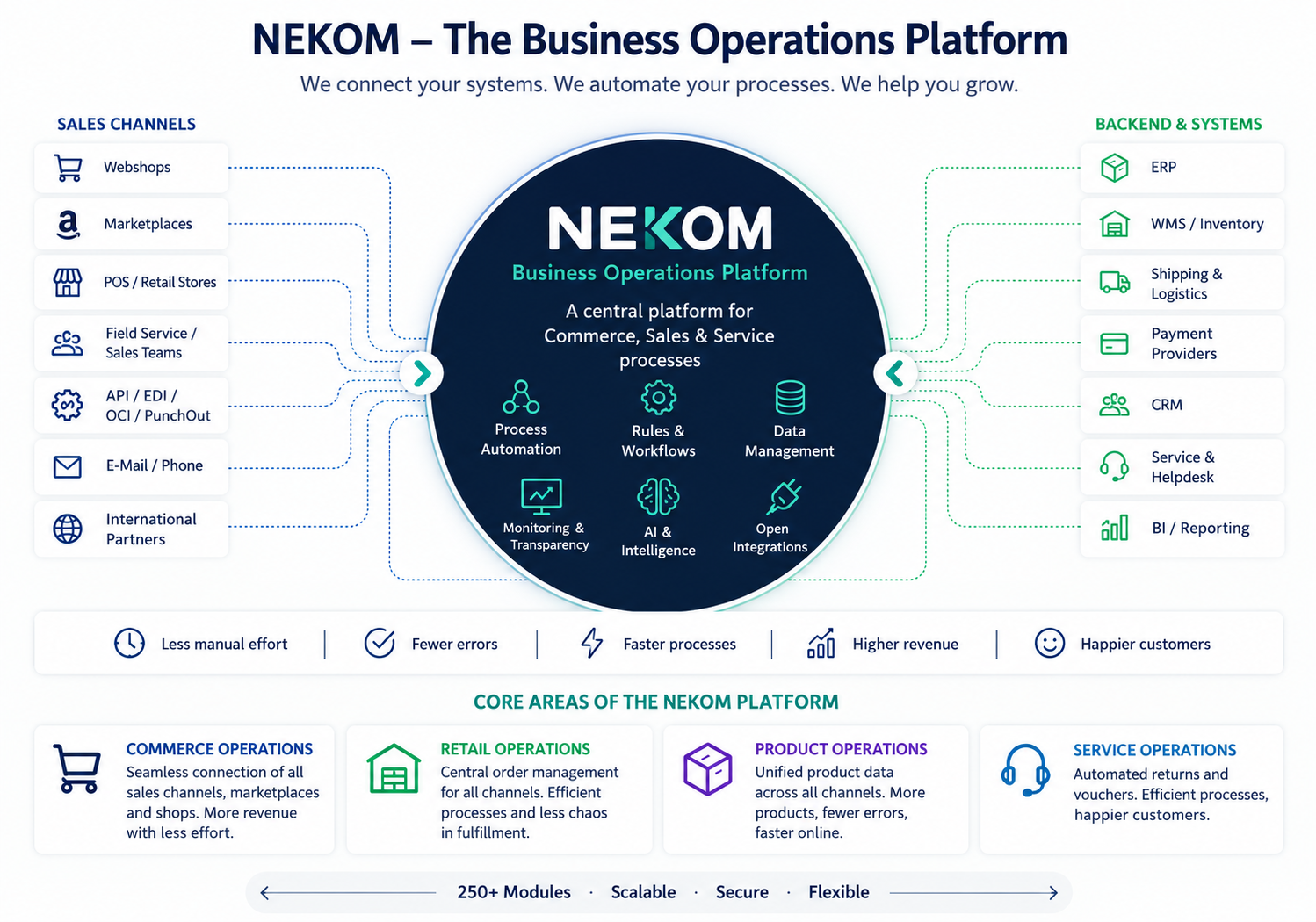
NEKOM architecture diagram

NEKOM architecture: seven sales channels on the left, central NEKOM platform, seven backend systems on the right and four operations pillars below. Diagram in English.
NEKOM Business Operations Platform architecture.View at full size (new tab)

THE FOUR PILLARS OF NEKOM

Four core areas. One shared platform.

Commerce, Retail, Product and Service Operations form the four pillars of the NEKOM Business Operations Platform. They connect sales channels to the workflows and systems behind them.

01

Commerce Operations

Bring products to new sales channels

You do not always need your own online store. NEKOM supports your launch on marketplaces and other digital channels, from product data to ongoing operations.

Commerce Operations details
02

Retail Operations

Coordinate orders and fulfilment

Process orders centrally across channels. Align routing, order splits, inventory reservations and shipping with warehouse and store systems.

Retail Operations details
03

Product Operations

Develop product information centrally

Manage variants, attributes and media consistently. Rules, AI-assisted text and translation prepare products for each channel.

Product Operations details
04

Service Operations

Connect service and returns

Handle customer requests, claims and returns in the context of the order. Connect self-service, credits and updates to sales channels.

Service Operations details

Get more done. Spend less time fixing things.

When orders, product data and customer service work together, your team spends less time finding and transferring information between steps.

Process orders instead of transferring data

Manage orders from your sales channels centrally and pass them to the next process steps using defined rules. Your team can see which cases need attention.

Illustrative status Order checked · Handover prepared

Maintain product data instead of entering it repeatedly

Manage attributes, variants and media centrally and prepare them for different sales channels. Rules can support recurring tasks.

Illustrative status Product maintained · Channel data prepared

Help customers instead of searching for information

Handle enquiries, complaints and returns in the context of the order, so your service team has the information it needs for the next step.

Illustrative status Order linked · Service case in view

Explore B2B sales and product information in more detail:

Define the process. Deliver together.

People working together on a project plan

PERSONAL COLLABORATION

In-house development. Dedicated contacts.

NEKOM combines platform knowledge with personal support. An in-house development team supports the adaptation of individual processes. Best practices provide a starting point for configuration.

In a joint workshop, the business, agency and NEKOM agree systems of record, business rules and responsibilities.

Discuss your project

THREE STEPS TOWARDS A CLEAR PLAN

What to expect from your first consultation.

  1. Analysis

    We discuss your store, marketplaces, ERP and warehouses, identify bottlenecks and assess where automation makes sense.

  2. Explore the platform

    See practical examples of how orders, inventory, payments and returns can work together.

  3. Next steps

    We discuss what an implementation could look like and the next steps for your business or agency project.

Book a free consultation

Free and without obligation. Booking opens HubSpot Meetings; its privacy terms apply.

FITS YOUR EXISTING ARCHITECTURE

Your commerce technology. Our operational connection.

Connectivity and scope are aligned with your systems and requirements.

FROM REQUIREMENT TO WORKFLOW

Where do your workflows lose time?

Discuss your systems, bottlenecks and next steps with Martin Kahr. Free and without obligation.

Book a free consultation