NEKOM OMS
Relevant orders in one view.
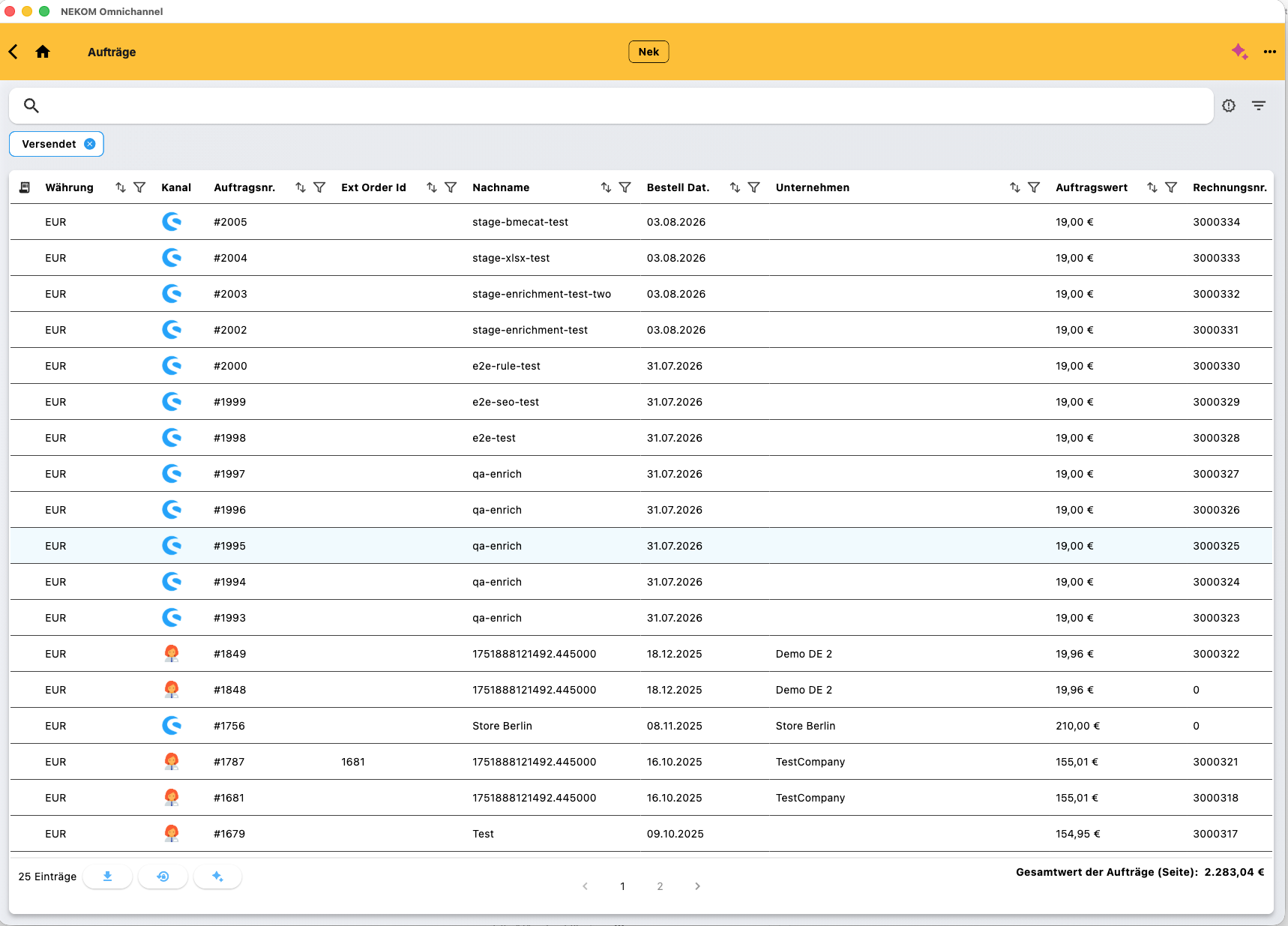
The order overview shows orders from connected channels. Search, filters and sorting support everyday handling. Status and references provide operational context.

Shopify Commerce Operations
Multiple warehouses, suppliers and channels change the requirements. NEKOM connects Shopify to the inventory and order workflows behind it.
One Shopify store, one ERP and one warehouse may be well served by a standard connector. Once supplier stock, stores, B2B reservations or more channels are involved, business rules determine what can be sold and how it can be shipped.
Discuss Your Use CaseInventory from ERP, warehouses and suppliers is aligned with the agreed Shopify channel rules.
A Shopify order reaches NEKOM. Items, fulfilment sources and ERP handovers follow the configured workflow.
Shipping updates and subsequent returns connect the customer channel to service, warehouse and ERP.
Conceptual process diagram. Not a configuration screen or a guarantee for a particular system combination.
THE CHALLENGE
One Shopify store, one ERP and one warehouse may be well served by a standard connector. Once supplier stock, stores, B2B reservations or more channels are involved, business rules determine what can be sold and how it can be shipped.
WHEN DATA TRANSFER ALONE IS NOT ENOUGH
Simple data transfer may be enough for simple operations. With several inventory sources, teams need to decide which quantities count, which reservations apply and how an order proceeds. NEKOM is especially relevant when those rules cross several systems.
HOW NEKOM CONNECTS THE WORKFLOW
NEKOM connects the Shopify channel to ERP, warehouses, suppliers and other relevant applications. Inventory information and order workflows follow agreed rules. Supported reservations, order splits and updates depend on configuration and connected systems.
Conceptual diagram. Configuration, interfaces and supported workflows are agreed for each project.
INTERACTIVE INVENTORY EXAMPLE
50 in your own warehouse, 20 at a supplier and 10 in a store. Adjust the illustrative rules for one sales channel.
Own warehouse50
50 + 20 + 10 − 10 − 5 = 65
A simplified demonstration of potential business rules. Not NEKOM’s actual inventory algorithm or an availability guarantee. Quantities and rules are illustrative only.
Example: item A ships from your own warehouse and item B directly from a supplier. NEKOM supports coordination within the agreed process scope.
Item A→Own warehouse
Item B→Supplier / dropshipping
Illustrative workflow, not evidence of a specific automatic routing or optimisation method. Splits, status updates and returns depend on configuration.
THE ACTUAL PRODUCT
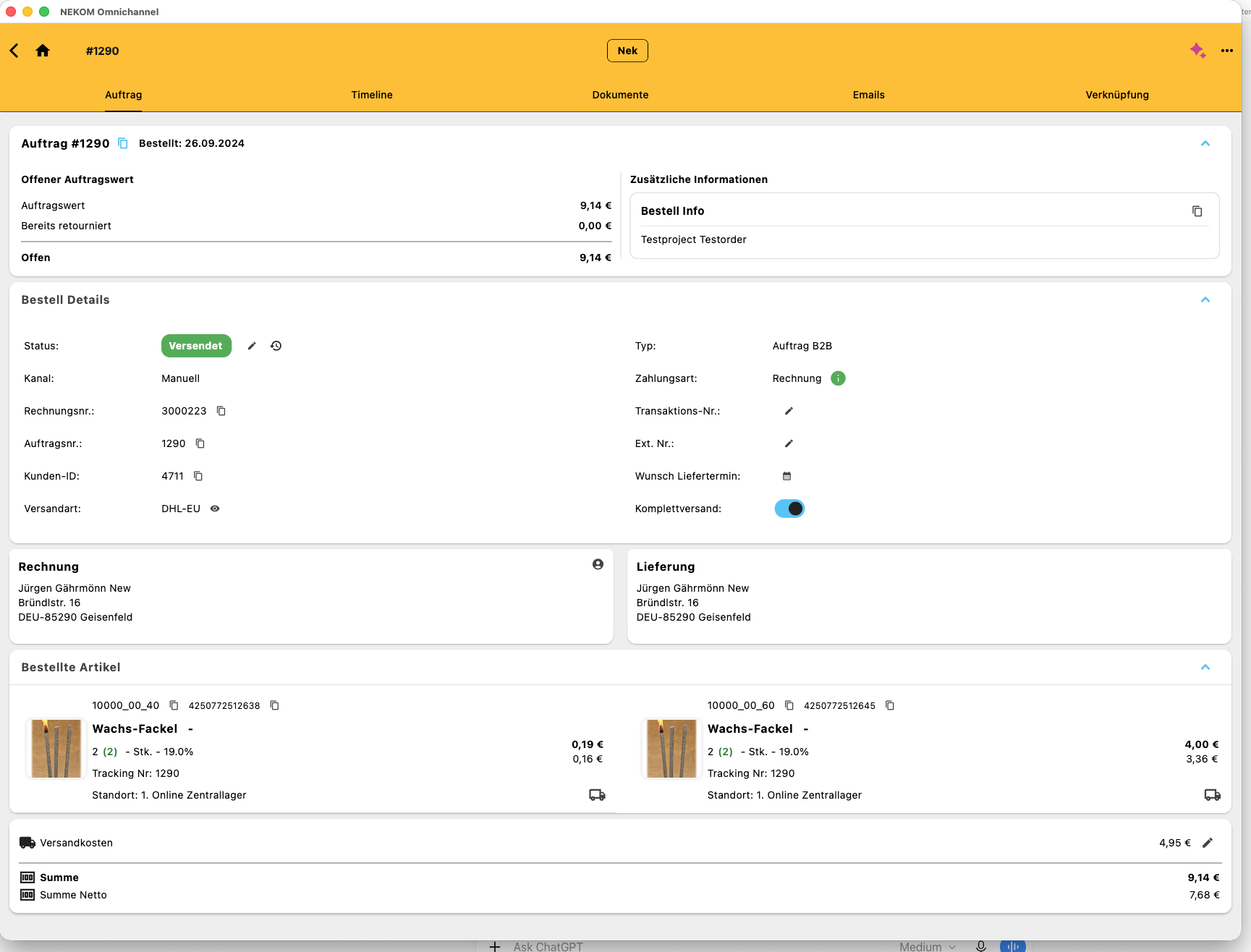
Authentic NEKOM application views. The visible information is test data. These views illustrate general functions, not a named customer’s production system.
NEKOM OMS
The order overview shows orders from connected channels. Search, filters and sorting support everyday handling. Status and references provide operational context.
NEKOM OMS
The detail view brings together status, order items, customer context, billing and delivery information. It illustrates operational handling after an order reaches NEKOM.
OPERATIONAL VALUE
The Shopify store stays focused on the commerce experience. Agencies can design inventory and order logic with the client and NEKOM, with a clear split of responsibility.
PLATFORM & INTEGRATIONS
Process orders from different channels centrally and connect them to ERP, warehouse and service.
02Bring multiple warehouses and suppliers into connected logistics workflows.
03Prepare inventory from existing ERP, supplier and POS systems for digital sales channels.
04Register returns in a structured way and connect handling to downstream processes.
CUSTOMER EVIDENCE & CONTEXT
The existing NEKOM website describes anonymous practical workflows using Shopify and marketplaces. This does not imply every combination of channels and systems is supported out of the box. Paul Wiegand is a BigCommerce project and is not presented as a Shopify reference.
Explore customer storiesBring warehouse, supplier and ERP inventory together for commerce.
02Connect new commerce experiences to established enterprise systems.
03Bring your own warehouses and suppliers into shared workflows.
FOR BUSINESSES
Discuss your systems, responsibilities and the most useful first workflow with us.
Discuss Your ProjectFOR AGENCIES
Your commerce expertise and our operations platform: let’s define the right way to work together on your client project.
Become a Partner